
User data reports #
The online report starts with the account's default Dataset. You can select another available Dataset or explicitly choose All available Datasets. This limits records and related species, sites, media and custom fields, including CSV export. The report contains the user's own records. Breedings and breeding journals are independent of Datasets and remain account-wide.
A full SQLite backup still includes the entire private database. The new offline Viewer requires selecting a Dataset or All Datasets in this backup before record export. An older HTML file receives this feature after the next successful backup.
User data reports (technical name: SQLite Database Report) provide the user's private data in a readable, secure and read-only form. The feature combines three complementary solutions:
- an online version at
report_html.php, showing current data directly from the active private SQLite database, with search, filtering, per-tab CSV export and printing to PDF or paper; - the SQLite Database Report - offline version, a self-contained HTML file containing the private data state from the time of the backup.
- the SQLite file browser, on a separate page opened with the Browse a SQLite file button at the bottom of the online report; it lets you view your own downloaded
.sqliteor.dbbackup once.
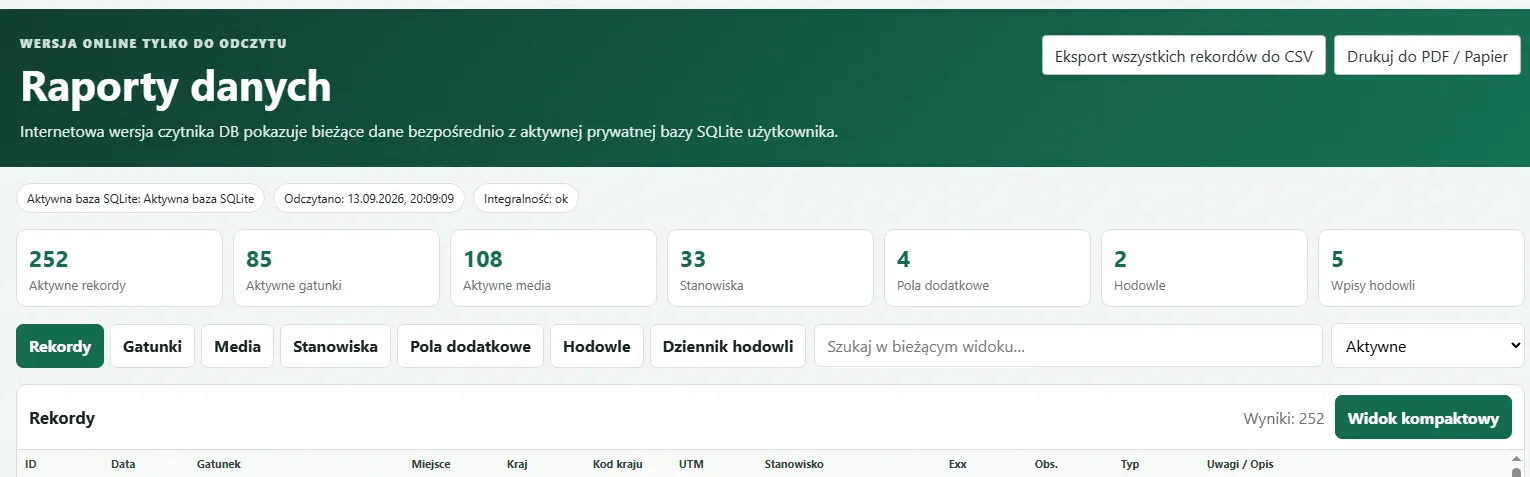
The offline version does not require an ENTOMONE sign-in or an internet connection. It does not open or directly read the SQLite database file.
Where the offline report is located #
After a successful backup, ENTOMONE creates or refreshes this file on Google Drive:
ENTOMONE/ENTOMONE-Viewer.html
The file can be downloaded from Google Drive or opened from a folder synchronised to the computer with Google Drive. Open it locally in a standard web browser.
How the offline report is created and refreshed #
ENTOMONE generates the report after a successful, verified full backup of the private SQLite database. The data is embedded directly in the HTML file. The report therefore shows the data as it existed at the time of the latest successful backup, not the current state of the active database on the server.
The file is refreshed after subsequent successful backups. The report displays details including the backup creation time, database file name, integrity check result and source backup checksum.
Browsing scope #
The report can present:
- observation records,
- species,
- media,
- sites with coordinates, UTM square, elevation, GPS radius, visit dates and statistics,
- custom fields,
- breedings,
- breeding journal entries.
Local search, filtering of active, all and deleted records, sorting and pagination are available. Export to CSV in both the online and offline report saves every row matching the current tab, search, filter and sort order - not only the currently visible table page. The file contains the complete set of columns for that tab. In the Sites tab, coordinates are available as separate Lat and Lon columns and as one combined Lat, Lon value; the 10 km UTM square is calculated automatically from the coordinates. Technical date-time columns, such as “Updated”, use the account time zone and the YYYY-MM-DD HH:MM:SS format. A tab is shown when that type of data is present in the backup.
Limitations and security #
SQLite file browser - one-time opening of a downloaded backup #
On the separate Browse a SQLite file page, available through the button at the bottom of the online report, you can choose your own .sqlite or .db file downloaded to your computer, for example from Google Drive or another location. ENTOMONE checks that it is a complete ENTOMONE SQLite backup, opens it read-only and shows it in the same report view. The file is not imported, does not change the active database and is removed from the server after the page is prepared. Refreshing the page requires choosing the file again.
The SQLite file browser is strictly read-only. It contains no editing forms or SQL console, does not modify the SQLite backup or connect to the active ENTOMONE database. It also does not read other files from the computer or retrieve data from the internet.
The report does not replace the full ENTOMONE application. It does not contain central account, permission or shared Database information, and its data is only as current as the latest successful backup.
Privacy of the active database and backups #
This gives the user independent, local access to a report of their data without giving the HTML file access to the active database or to the ENTOMONE server.